Coloring a Minecraft Message
The Java code:
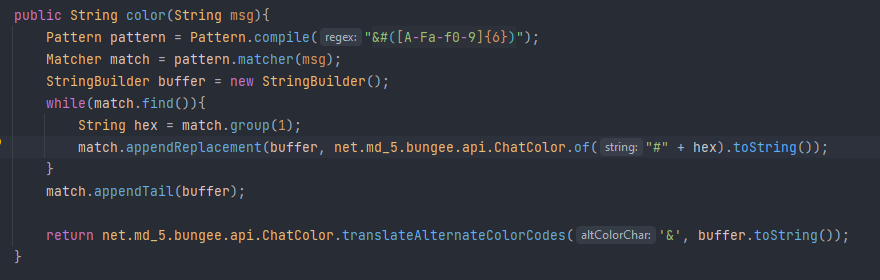
Explanation:

- > This compiles a Regular Expression pattern to match inside of a String. This is important for finding hex colors inside of the message and converting to Bukkit's color "character", which is '&'. Since Minecraft 1.16, hex colors are supported for the client, so this is possible only new versions.

- > This creates a wrapper that can can perform different options using the provided the previous pattern object.

- > This is a buffer for handling appending a character or string to another string, so that it can be combined into a single String literal.

- > This block of code will continuously look for a matching pattern in the provided in the string until none are left. When found, the matched sequence is replaced with the specified String, then moves the cursor to the end of the position for the next search.

- > This appends everything inside of the matcher object to the buffer, having completely converted all hex codes to '&' color codes.

- > This function now translates all the color codes into "ChatColor.WIHTE" or etc so that the client can accurately represent the colors. The final product is all normal &-sign color codes and hex codes being formatted.
Examples
Before:

After: